Troubleshooting
Having issues with TAOM? Check the guides below for common problems and solutions.
Load Order
Bannerlord Version 1.2.12
- Harmony v2.3.6.220
- Palatinr Debugger Writes to a log on crash — share the log with us to help diagnose
- BetterExceptionWindow v7.1.1.0
- ButterLib v2.10.0.0
- UIExtenderEx v2.13.0.0
- MCM v5.11.3.0
- Native 1.2.12.X
- Sandbox Core 1.2.12.X
- Sandbox 1.2.12.X
- StoryMode 1.2.12.X
- CustomBattle 1.2.12.X
- Birth and Aging Options
- LOTR_Map
- LOTRAOM_Armory
- Alliance.Wargs
- LOTRAOM 0.69.39
Disable Naval DLC
The Naval DLC is not compatible with TAOM and can cause crashes or broken gameplay. Steam sometimes re-enables it automatically after updates.
Before every play session, check your Bannerlord launcher and make sure the Naval DLC module is unchecked / disabled. While you're there, verify your full load order matches the one above.
Tip: If you're experiencing unexplained crashes after a Steam update, this is the first thing to check.
Delete Cached Shaders
If you have played this mod before, it is recommended you delete your cached shaders to avoid graphical issues.
C:\ProgramData\Mount and Blade II Bannerlord\Shaders\TerrainShaders\LOTR_Map Note: ProgramData is a hidden folder. You can paste the path directly into File Explorer's address bar to navigate
to it.
Delete this entire folder, then launch the game. Shaders will be regenerated automatically.
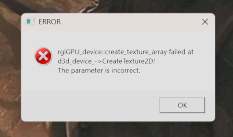
Texture Creation Failure
If you see the following error on launch:
Fix
Set Terrain Quality in your game settings to Medium or higher.
Other GPU / Texture Errors
If you encounter any other GPU or texture-related errors, delete the entire Shaders folder:
C:\ProgramData\Mount and Blade II Bannerlord\Shaders Note: ProgramData is a hidden folder. Paste the path directly into File Explorer's address bar.
DLL File Error — "Cannot load"
If you see an error like this:
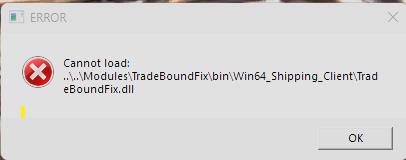
This means Windows has blocked the mod's DLL files. You need to unblock them.
Fix (PowerShell — Recommended)
Open PowerShell as Administrator and run:
gci -Path "C:\Program Files (x86)\Steam\steamapps\common\Mount & Blade II Bannerlord\Modules" -Recurse |
          Unblock-File
Note: Change the drive letter if your game is installed on a different drive.
Fix (Manual)
You can also unblock files individually:
- Navigate to the DLL file shown in the error
- Right-click the file and select Properties
- At the bottom of the General tab, check Unblock
- Click Apply
Names Replaced with Native Bannerlord Names
Q: Why are the names in the mod replaced with ones from native Bannerlord?
- The mod is currently only supported in English. Make sure your game language is set to English.
- If your language is already set to English and you still have this problem, you are most likely missing files and need to redownload the mod.
Performance Issues
Campaign Map FPS Drop
If you experience low FPS or stuttering on the campaign map:
- Open the game Options menu
- Start by unchecking Strategic AI
- If that doesn't help, re-enable it and try disabling other options one by one
- This will help you identify which setting is causing the performance issue
Long Loading Screen / Horse Stopped Moving
Q: I'm stuck on a loading screen, is this normal?
Q: I load the game and the horse in the bottom right has stopped moving, is that normal?
Yes — each time you run the mod after a new or fresh download, the game needs to compile all of the files, shaders, and code. This is a one-time process and can take anywhere from ten minutes to two hours depending on your hardware.
Be patient and let it finish. Subsequent launches will be much faster.
My Game is Crashing
If your game crashes, follow these steps so we can help diagnose the issue:
- When the crash report appears, save the report as HTML
- Go to our Discord server
- Open a support ticket
- Include your load order, what you were doing when it crashed (context), and attach the crash report
We will help you as we are available.
Where is the Music?
Q: The game has no music / where is the custom soundtrack?
We are actively working on a custom soundtrack. Unfortunately, Bannerlord 1.2.12 requires replacing the entire soundtrack to add custom music — there's no way to add tracks individually. This limitation may change in version 1.3.
For now, the mod ships without custom music. Stay tuned for updates.
Still stuck? Join our Discord community for help.